
PT Plan Management: Plan, Track, and Prove Your Proficiency Testing — All for Free
PT Plan is NAPT’s free planning and tracking tool for your ISO/IEC 17025 proficiency testing program. Document what you need, order or link your tests, and print an auditor-ready report — all in one place, at no cost.

How It Works
Step 1
Build Your Plan
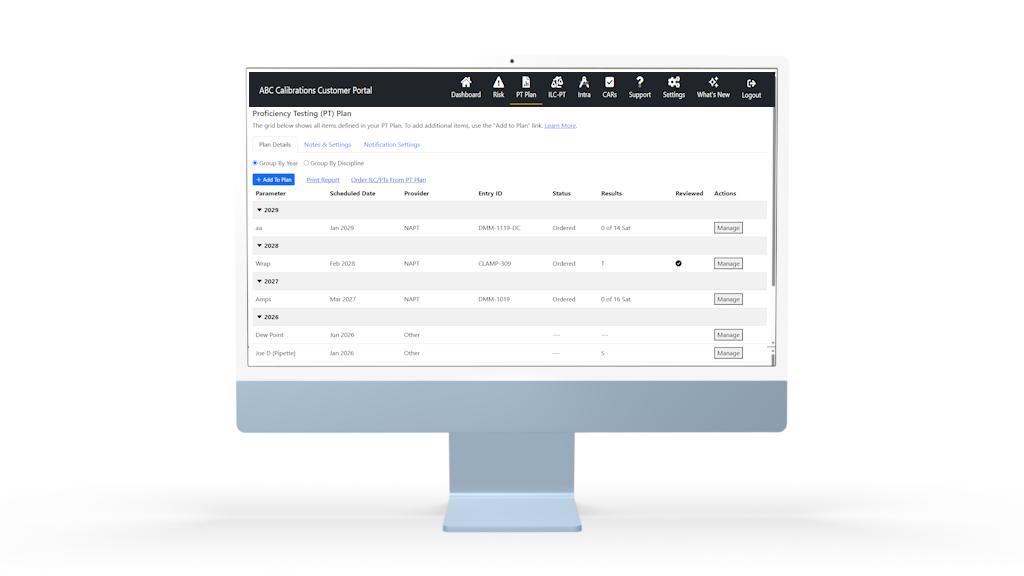
Add entries by discipline, parameter, and planned month or year. Choose NAPT, Intra, or another provider for each — your whole PT program in one grid, not three.
Step 2
Order or Link Your Tests
Order NAPT ILC/PTs directly from your plan — no re-entering information you already provided. Already ordered elsewhere? Link existing enrollments to keep everything in one view.
Step 3
Track Results
Results sync automatically from linked NAPT tests, or record them manually — with a full review workflow so you know what’s been checked and by whom.
Step 4
Print Your Report
Generate an auditor-ready Proposed Proficiency Testing Plan PDF for any year range, whenever you need it — not just once a year under deadline pressure.
Most Labs Still Track Their PT Plan in Spreadsheets:
The NAPT Advantage
With NAPT’s PT Plan, you’ll have the tools to run your entire proficiency testing program from one place.
- Centralized management — Track every planned test in one place, by discipline, parameter, and provider, instead of scattered spreadsheets and file folders.
- Built-in reminders — Set monthly, quarterly, or annual reminders so upcoming tests never slip through the cracks.
- Order directly from your plan — Move from planned to ordered in one click, with no re-entering information you’ve already provided.
- Automatic results tracking — Results sync automatically from your linked NAPT tests, with a full review trail showing what’s been checked and by whom.
- Auditor-ready reporting, on demand — Generate a Proposed Proficiency Testing Plan PDF anytime, for any year range, instead of scrambling before an assessment.
- Multi-location visibility — Review every site’s PT plan from one summary report if your organization has more than one location.
The NAPT PT Plan Management tool is available to be used by anyone with a customer portal account. Go to the Customer Portal page today to setup your free account.
